

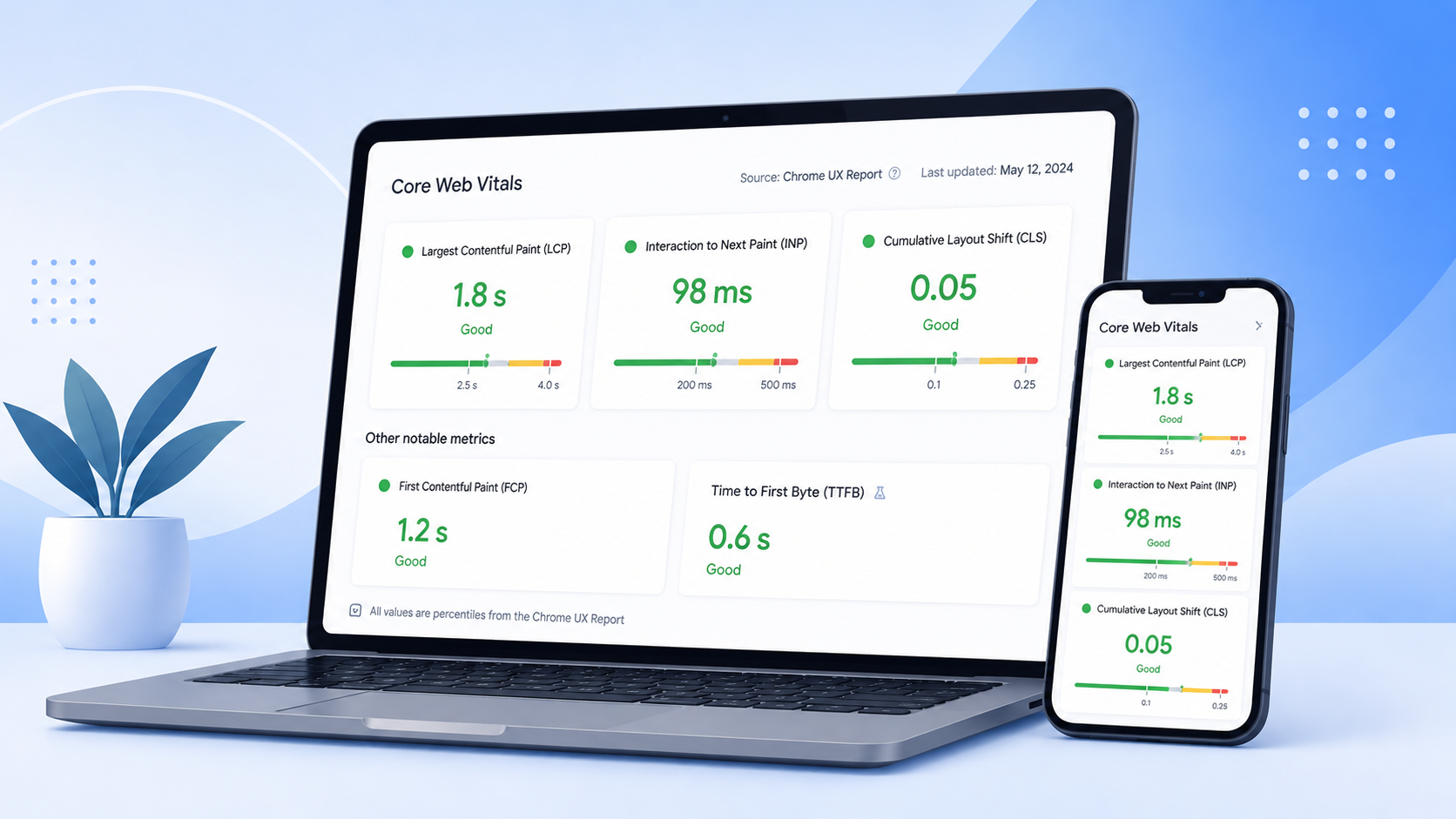
The Real Reason behind your Dropping SERP Rankings
A business owner once told me his website “looked perfect” on his laptop. Then he checked Google Search Console and found something strange: organic traffic had been quietly sliding for months, even though he hadn’t changed a single word of content.
The content was fine. What wasn’t fine was how the page behaved the moment a real user on a mid-range phone, on patchy 4G, actually tried to use it.
That gap between “looks fine to me” and “feels fine to everyone else” is exactly what Core Web Vitals measures. It’s one of the most underrated reasons websites quietly lose rankings, leads, and revenue.
What are Core Web Vitals?
Core Web Vitals are three measurable signals Google uses to judge how a webpage feels to use, not how it looks, but how it performs for a real user:
- How fast the main content appears
- How quickly the page responds to clicks or taps
- How visually stable it stays while loading
Think of it like judging a restaurant. The menu (your content) might be excellent, but if the food takes forty minutes and the table wobbles, the menu stops mattering. CWV scores the “service experience” of your site, separate from the content on it.
Why Google Introduced Core Web Vitals
Google’s business depends on people trusting search results enough to keep clicking. A slow, unresponsive top-ranked page reflects on Google too, not just the website.
Before CWV, “site speed” was measured in vague ways that didn’t match what a human actually felt, a page could “load” quickly while buttons stayed unresponsive and content jumped around mid-load. Google introduced these metrics to measure the page the way a person experiences it, not just the way a server delivers it.
Why Core Web Vitals Matter for Businesses and SEO
Here’s the part that matters more than the technical definitions: CWV are a trust signal, and trust converts visitors into customers.
Consider two near-identical landing pages selling the same product at the same price. One loads instantly and never shifts under your thumb. The other takes a few seconds, makes you tap “Buy Now” twice, and shifts right as you click, so you tap the wrong thing. Which one would you trust with your payment details?
This is the business reality behind the technical metric:
| Business Impact | How Core Web Vitals Drives It |
| Lower bounce rate | User don’t leave before content appears |
| Higher conversions | Forms and buttons respond instantly |
| Better rankings | Google factors page experience into visibility |
| Stronger brand trust | A stable, responsive site signals professionalism |
| Lower Google Ads costs | Landing page experience affects Quality Score |
During audits at our SEO agency in Coimbatore, we’ve consistently seen pages with poor CWV scores carry higher bounce rates even when content is strong, it never gets a fair chance because visitors leave before it loads.
How Google Measures Core Web Vitals
Google uses two distinct approaches. Field data consists of data collected in the real-world by actual Chrome users on your site, and is what Google uses most for ranking it, because it reflects the real-life experience of users on devices and networks. Lab data (Lighthouse, PageSpeed Insights); This is a type of simulated testing performed in a controlled environment, which can be helpful to determine why a page is slow, but which can only test one set of conditions, not the diversity of the actual users.
Review both via PageSpeed Insights and the Core Web Vitals report within Search Console, the best free tool to determine real traffic scores.
The Three Core Web Vitals
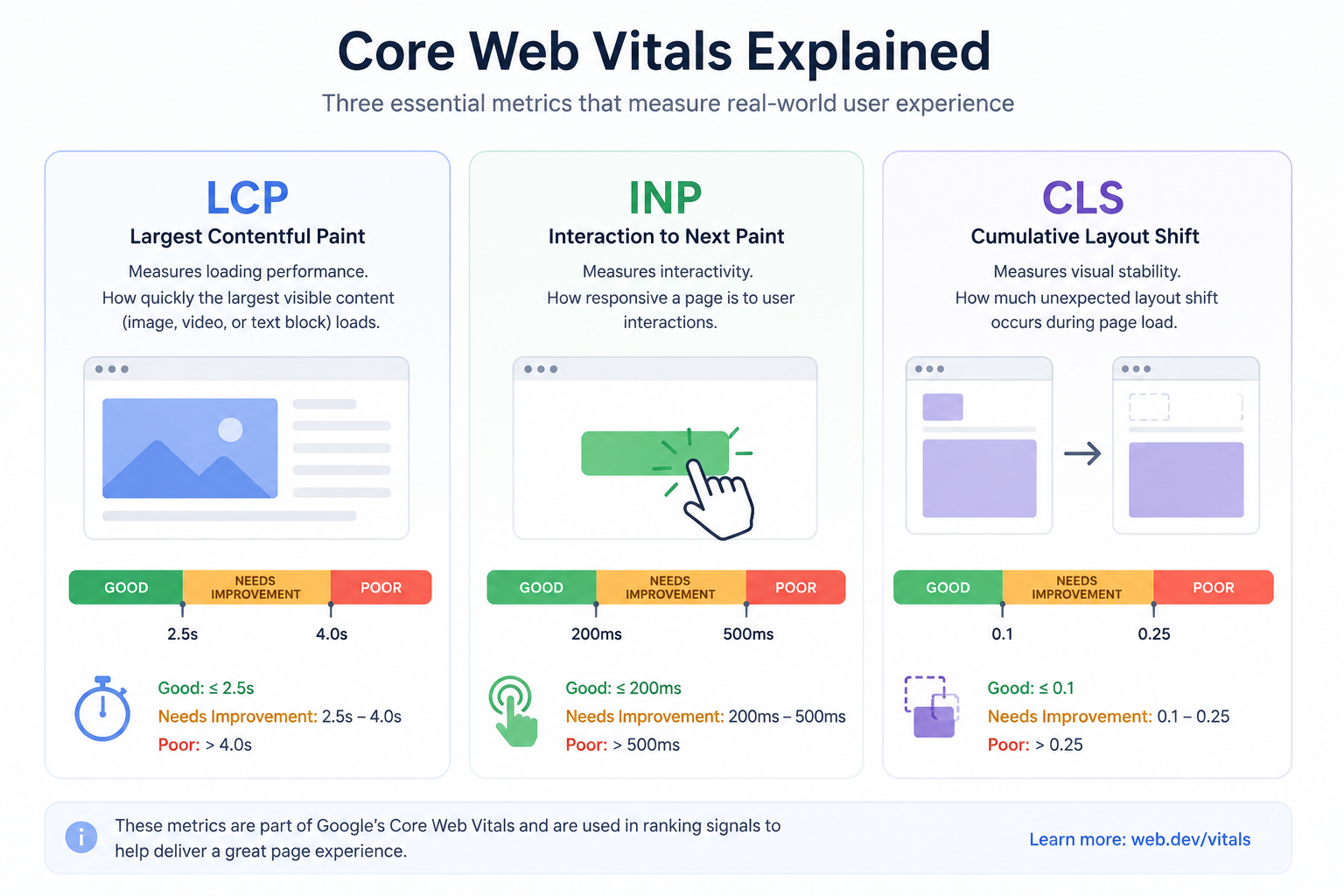
Largest Contentful Paint (LCP) – How fast does the main thing show up?
- Business impact: compress and resize hero images (WebP), use a CDN, preload the largest above-fold image, optimize server response.
- Analogy: 2.5 seconds or less.
- Common causes: One of the most often observed poor LCP issues in our audits is the use of a full-resolution camera or stock image without compressing the image. That delay is LCP..
- Optimization steps: compress and resize hero images (WebP), use a CDN, preload the largest above-fold image, improve server response.
- Ideal score: 2.5 seconds or faster.
- Common Mistake: Using a full-resolution camera or stock image without compressing it, one of the most frequent causes of poor LCP in our audits.
Interaction to Next Paint – How quickly is the page responsive when touched?
- Business impact: Nothing frustrates a visitor faster than tapping a button that seems to do nothing. They tap again, now they’ve submitted a form twice or given up.
- Analogy: Press the light switch and wait 1 full second before the bulb lights. It’s a wonder if it is broken, since it will work, but in the meantime, one would think it was broken.
- Common causes: heavy unoptimized JavaScript, too many third-party scripts, large DOM structures, long-running background tasks.
- Optimization steps: break up long JavaScript tasks, defer non-essential scripts, remove unused plugins, minimize main-thread work during interaction.
- Ideal score: 200 milliseconds or less.
Cumulative Layout Shift (CLS) – Is the page as stable as it can get while loading?
- Business impact: Layout changes lead to inaccuracies in clicks. A visitor tapping “Read More” who instead taps an ad that just loaded above it won’t trust your brand.
- Analogy: Picking up a swinging door handle as it swingers to the left. Irritating – and definitely not something you want to do again.
- Common causes: images/videos without defined dimensions, ads or embeds without reserved space, late-loading web fonts, dynamically injected banners.
- Optimization steps: set explicit width and height on images and embeds, reserve space for ads before they load, preload key fonts, load cookie banners without pushing content.
- Ideal score: 0.1 or lower.
- Common Mistake: Inserting a promotional banner at the top of the page without reserving its space, which shoves everything downward the instant it loads.
What Happens If You Ignore Core Web Vitals?
Ignoring CWV doesn’t cause a collapse it causes a slow, quiet erosion that’s easy to misattribute to other things:
- Organic traffic stabilizes despite consistent content output
- Higher bounce rates on landing and product pages
- Lower conversions blamed on “weak copy” or “wrong audience”
- Rising Google Ads costs from poor landing page experience
- Leaner competitors slowly outranking stronger content
None of this screams “CWV problem” so businesses fix the wrong thing for months before checking PageSpeed Insights.
How to Increase Website Speed
General website speed influences nearly everything above:
- Quality hosting. Shared, overloaded servers cap every other optimization.
- Caching. Page and browser caching cut repeat load times dramatically.
- A CDN. Important if visitors aren’t located near your server.
- Modern image formats. WebP or AVIF at correct dimensions.
- Defer JavaScript/CSS. Load only what’s needed for the visible part first.
- Fewer third-party scripts. Audit chat widgets and tracking pixels regularly.
- Lazy loading. Below-the-fold images shouldn’t compete for priority.
WordPress Optimization Guide for Core Web Vitals
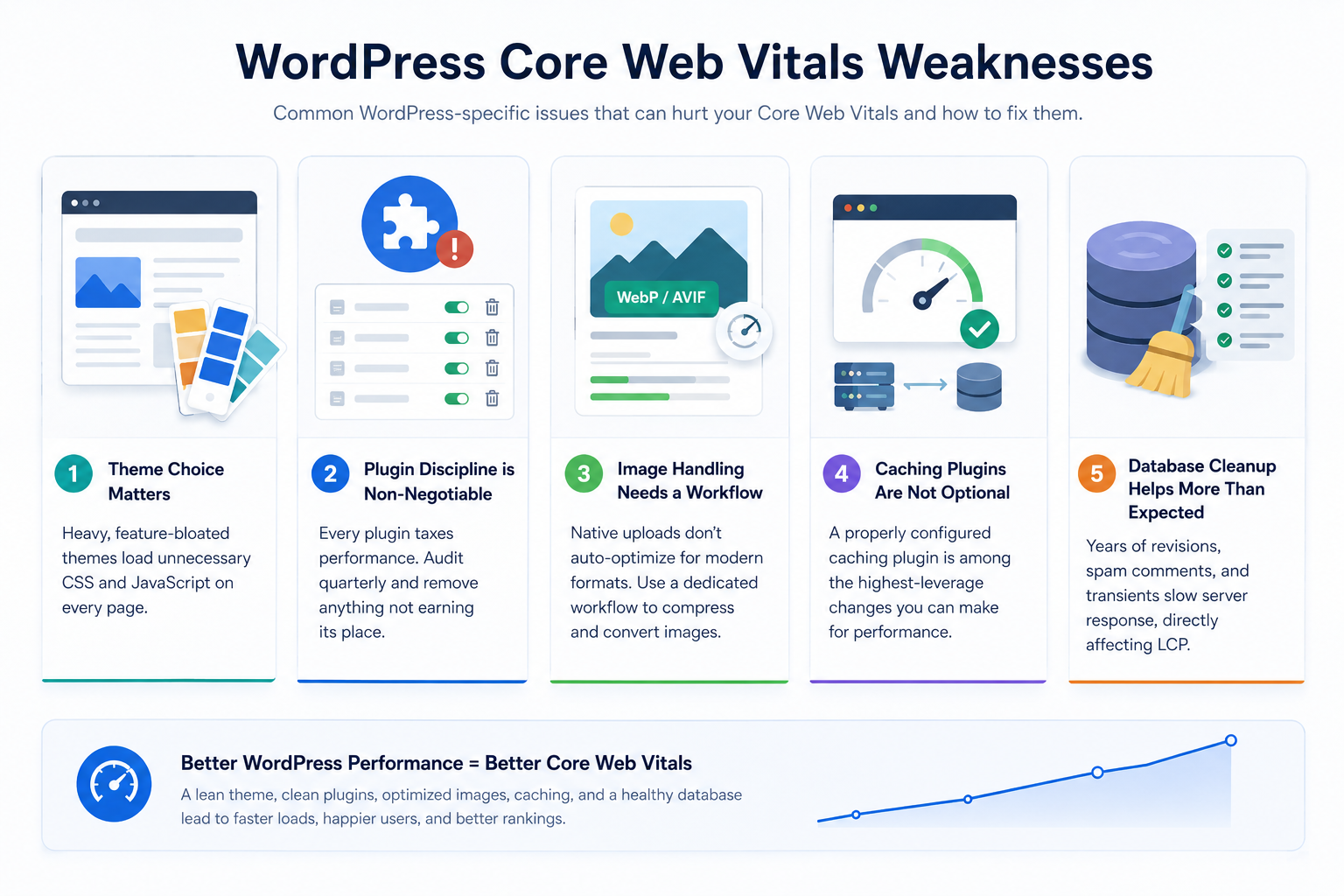
WordPress has its own specific Core Web Vitals weaknesses. Theme choice matters more than people think, heavy, feature-bloated themes load unnecessary CSS and JavaScript on every page. Plugin discipline is non-negotiable, every plugin taxes performance, so audit quarterly and remove anything not earning its place. Image handling needs a dedicated workflow, since native uploads don’t auto-optimize for modern formats. Caching plugins are not optional, a properly configured one is among the highest-leverage changes available. Database cleanup helps more than expected, since years of revisions and spam comments slow server response, directly affecting LCP.
Common Mistakes Businesses Make
- Treating it as a one-time fix. Scores drift as content and plugins get added over time.
- Optimizing only the homepage. Product pages and landing pages need attention too.
- Chasing a perfect lab score while ignoring field data. A flawless lab score means little if real visitors still struggle.
- Adding speed plugins without removing the root cause. Caching can mask a slow theme temporarily, but the weight is still there.
- Ignoring mobile performance. Most traffic is mobile, and mobile is far less forgiving of heavy pages.
Core Web Vitals Checklist
- Hero images compressed and properly sized
- CDN implemented for global or multi-region visitors
- Caching plugin configured and tested
- Unused plugins and scripts removed
- Third-party scripts audited and deferred where possible
- Explicit width/height set on all images and embeds
- Space reserved for ads, banners, and cookie notices
- Fonts optimized to avoid layout shift on load
- PageSpeed Insights tested on both mobile and desktop
- Core Web Vitals report in Search Console reviewed monthly
Conclusion:
Core Web Vitals aren’t a vanity metric, they’re a direct readout of what every visitor feels within seconds of landing on your site. Fast, stable pages earn trust before a word of content is read. Slow, jumpy ones lose that trust just as quickly, often without the business realizing why traffic or conversions are slipping.
The most useful first step isn’t guessing, it’s running an actual Website Performance Test on your live pages and seeing where the real numbers land.
If you’d like a second set of eyes on what a performance test reveals, Xplore Intellects Private Limited works with businesses in Coimbatore and beyond on Technical SEO, Core Web Vitals optimization, and WordPress SEO, turning these diagnostics into a clear, prioritized action plan.
FAQ:
1. Are Core Web Vitals a direct ranking factor?
Yes, as part of Page Experience signals, though content quality carries more weight.
2. How often should I check my scores?
Monthly, plus after any major site or plugin update.
3. Can a site pass on desktop but fail on mobile?
Yes, very commonly, mobile devices have less power and slower networks.
4. Does fast hosting alone fix it?
It helps LCP, but can’t fix layout shifts or interaction delays alone.
5. What’s a good overall score?
Passing all three: LCP under 2.5s, INP under 200ms, CLS under 0.1.
6. Why do scores vary day to day?
Lab data shifts with network conditions; field data shifts as traffic changes.
7. Do Core Web Vitals matter more for e-commerce?
Yes, checkout flows are interaction-heavy, so poor INP or CLS threatens sales.
8. Can plugins alone cause failures on WordPress?
Yes, plugin-loaded scripts are a common cause of poor INP and LCP.
9. Should I prioritize this over content quality?
No, they work together, strong content with poor performance loses visitors before they read it.
10. How long until improvement shows up?
Lab data updates immediately; field data takes about 28 days to fully reflect changes.