

Suppose that your developer writes half the code – and that the rest is done by an AI. That’s not science fiction anymore. That’s Tuesday in 2026.
Though you may be a startup founder who is trying to launch as quickly as possible, or you may be a developer who is just stuck on doing repetitive tasks, ai tools for coding have radically changed what is possible, and how quickly you can actually get there. The question isn’t should you use them. It’s which ones actually work for web development.
This is a guide that will take you through the most excellent AI tools in web development in 2026, how each one of them will fit into real world projects and what business owners (not just developers) should know before hiring a team of people or choosing a tech stack.
1. Why AI Tools Matter More Than Ever in 2026
Web development has always been fast-paced. But in 2026, the gap between teams using AI and teams that aren’t has become impossible to ignore.
A developer using the right AI stack can ship a feature in hours that used to take days. For a business, that means lower costs, faster launches, and fewer revision cycles.
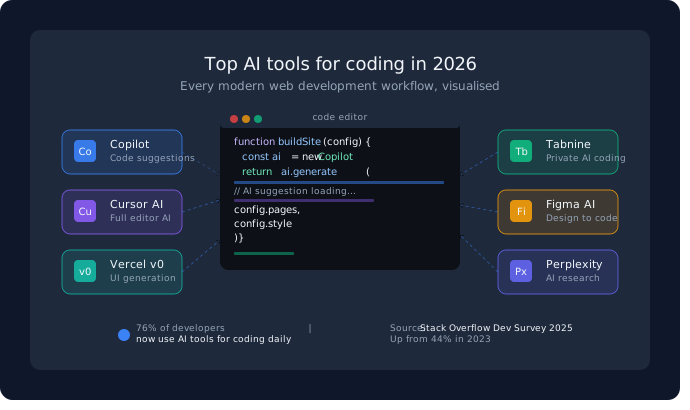
According to Stack Overflow’s 2025 Developer Survey, over 76% of developers now use AI tools in their daily workflow — up from 44% just two years ago. That number is only going up.
The best part? These tools aren’t just for senior engineers. Freelancers, agency teams, and even non-technical founders are using ai tools for coding to build smarter.
2. GitHub Copilot – Is It Still the King of AI Tools for Coding?
Short answer: Yes, but with competition.
GitHub Copilot is built into VS Code, JetBrains, and most popular IDEs. It is capable of proposing complete lines of code, entire functions, and even generating tests, in real time.
What it’s great for:
- Automatic completion of repetitive patterns of code
- Quickly writing boilerplate (API calls, database schemas, form handlers)
- Suggesting documentation for functions
Real-world scenario: A developer building an e-commerce site can ask Copilot to generate a product filter function — and get a working draft in seconds instead of spending 20 minutes writing it from scratch.
Limitation: Copilot can hallucinate outdated libraries or generate insecure code if you don’t review its output. It’s a smart assistant, not a replacement for human judgment.
3. Cursor AI – The Developer’s New Best Friend
When GitHub Copilot seems to be the prototype of the co-pilot, Cursor AI seems to be the one in the control.
Cursor is a full code editor that is based on VS Code, but with AI built into every aspect of it. You can select code and say refactor this, or explain a feature in plain English and watch it create the logic.
The reason why developers love it in 2026:
- Natural editing of language (you can talk to your code as you would a teammate)
- Codebase-wide context (it understands your entire project, not just the file open)
- Multi-file edits in one prompt
Best use case: Full-stack developers working on complex React or Next.js apps who want a smarter, faster way to debug, refactor, and build.
4. Vercel v0 – AI Website Creation That Actually Works
To an individual who takes AI website creation, the v0 tool of Vercel is a game-changer.
You can define a UI component – such as a pricing table with three levels, a switch between monthly/annual billing, a highlight on the Pro plan – and v0 produces clean, production-ready React + Tailwind code.
Why it’s different from no-code builders:
- It generates real code you can extend and own
- Integrates directly with Vercel’s deployment platform
- Outputs are component-based, not locked-in templates
For business owners: If you’ve ever paid for a website redesign and been frustrated by slow turnaround, v0 is why modern development agencies can work faster and smarter than they could even 18 months ago.
5. Tabnine – The Privacy-First AI for Development Teams
Not every company is comfortable sending their source code to a third-party. That’s where Tabnine stands out.
Tabnine provides on-premise deployment, which is to say that your code will remain in your own infrastructure. This is a key aspect to startups handling sensitive user data, fintech platforms, or healthcare applications. For teams evaluating ai tools for coding with data compliance in mind, Tabnine is the strongest option available.
Key strengths:
- Works offline and on private servers
- Trained on your team’s own codebase over time
- Supports 30+ programming languages
It’s slightly less impressive than Copilot in raw suggestion quality — but when data compliance matters, Tabnine wins.
6. Figma AI – Where Design Meets Development
Figma has always bridged the gap between designers and developers. With its 2025/2026 AI updates, that bridge got a whole lot shorter.
What Figma AI can do now:
- Auto-generate UI layouts from text prompts
- Suggest design system–compliant components
- Export developer-ready code directly from designs
For the best web development, having designers and developers work in one AI-enhanced tool means fewer miscommunications and faster handoffs. Teams at agencies and startups alike are cutting their design-to-development time by nearly 40% using these integrated workflows.
7. Perplexity for Developers – Research Without the Rabbit Hole
Every developer knows the pain: you hit a problem, open a browser tab to research, and 45 minutes later you’ve read 12 Stack Overflow posts and still aren’t sure which answer applies to your version.
Perplexity AI solves this with cited, version-aware answers to technical questions. It pulls from up-to-date documentation and community sources — and tells you where the answer came from.
Use it for:
- Comparing library options quickly
- Understanding breaking changes in a new framework version
- Getting quick architecture recommendations with reasoning
8. Pro Tip: How to Combine These Tools for Maximum Output

Expert Insight: The developers getting the most out of ai tools for coding in 2026 aren’t using just one tool — they’re building a workflow stack.
Here’s a high-performing combination used by modern development agencies:
- Figma AI → Design and prototype the UI
- Vercel v0 → Convert components to clean code
- Cursor AI → Build out logic, APIs, and integrations
- GitHub Copilot → Speed through repetitive patterns
- Tabnine → For sensitive codebases needing privacy
Each tool handles a different layer. Together, they eliminate most of the slow, frustrating parts of web development — without eliminating the human thinking that makes great products.
9. What This Means for Business Owners
If you’re a startup or SME looking to build or upgrade your website, here’s what the AI revolution in web development means for you:
- Faster delivery: Projects that used to take 3 months can now ship in 6–8 weeks
- Lower costs: Less time on repetitive work means lower billable hours
- Better quality: AI-assisted code review catches bugs early
- Smarter partners: When you work with a web development company, ask them which ai tools for coding they’re using — it’s a strong signal of how modern their workflow is
The tools are part of our development process at Xplore Intellects Pvt. Ltd. to create faster and more reliable websites and web applications to serve businesses.
Our team applies the power of AI-assisted development to deliver smarter solutions, whether that’s a landing page or a full e-commerce platform, or even a custom web app.
If you’re searching for the best web development in Coimbatore, it’s worth knowing which agencies have upgraded their workflow — and which haven’t.
Conclusion
AI tools for coding are no longer the hype, but have become part of the foundation. In 2026, the top web developers will not be competing with AI. They are working on it and are using tools such as Cursor, Copilot, v0 and Figma AI to work faster and build better than ever before.
This is a game changer to business owners. Now you can build your own site or web application more quickly, intelligently, and at less cost, however, only when you work with a team that knows how to leverage these tools to their advantage.

If you’re still exploring which tools are right for your next project, a good agency partner can guide you through the options based on your specific goals.
Seeking a contemporary web development team in Coimbatore to develop using AI-driven tools?
Xplore Intellects Pvt. Ltd. is a company that specializes in the development of websites in Coimbatore, with a combination of technical skills and AI-driven workflow to achieve real business outcomes. Let’s build something great together.
Frequently Asked Questions
Q1: What is the best AI tool for web development in 2026?
There’s no single “best” — it depends on your workflow. For most developers, Cursor AI and GitHub Copilot together cover the widest range of tasks. For UI work, Vercel v0 is exceptional.
Q2: Can AI tools replace web developers?
No — and this is important. AI tools speed up execution but they don’t replace architectural thinking, UX judgment, or problem-solving. They make good developers faster, not redundant.
Q3: Are AI coding tools safe to use with client data?
It depends on the tool. Tools like Tabnine offer private, on-premise deployment. Always review the data policy of any AI tool before using it on a client project with sensitive data.
Q4: How does AI website creation work?
AI website creation tools like Vercel v0 take a text description of what you want (a layout, a component, a full page) and generate working code. Unlike website builders, the output is real, editable code — not a locked template.
Q5: Is it worth hiring a web development agency that uses AI tools?
Yes — provided they understand when not to use AI too. Agencies using ai tools for coding tend to deliver faster and maintain better code quality. Ask them specifically about their toolset and review process.